. Python
I am a developer from India....
What is python :-
Python is a dynamically typed, general purpose programming language that supports an object -oriented programming & approach as well as a functional programming approach
. Why Learn Python?
Python is currently the most widely used multi-purpose, high-level programming language, which allows programming in Object-Oriented and Procedural paradigms. Python programs generally are smaller than other programming languages like Java. Programmers have to type relatively less and the indentation requirement of the language, makes them readable all the time.
The biggest strength of Python is huge collection of standard library which can be used for the following:
Python Online Compiler/Interpreter
There are two ways you can execute your Python program. first, we write a program in a file and run it one time. Second, run a code line by line. Here we provided the latest Python 3 version compiler where you can edit and compile your written code directly with just one click of the RUN Button.
Python Jobs
python is the most in-demand programming language in 2023, with companies of all sizes looking for Python programmers to develop websites, software, and applications, as well as to work on data science, AI, and machine learning technologies. There is a high shortage of Python programmers, and those with 3-5 years of experience can command salaries of around $150,000 per year in the United States.
Here is a list of companies that are hiring Python programmers:
Applications of Python
There is a wide range of applications that Python can be used for.
Web development: Django, Flask, Pyramid
Machine learning and artificial intelligence: TensorFlow, PyTorch, scikit-learn
Data science and data visualization: NumPy, Pandas, Matplotlib, Seaborn
Desktop GUI: PyQt, Tkinter, Kivy
Web scraping: Scrapy, Beautiful Soup, Selenium
Game development: Pygame, Godot, Unity (with Python plugin)
Business applications: Odoo, ERPNext, Tryton
Audio and video applications: FFmpeg, Librosa, OpenCV
Embedded applications: MicroPython, CircuitPython, Py板
Trending Python Applications in 2023
Here are some of the trending Python applications in 2023:
NExT-GPT: A multimodal large language model that can generate text, translate languages, write different kinds of creative content, and answer your questions in an informative way.
ControlNet: A diffusion model that can be controlled to generate specific images.
ProPainter: A video inpainting model that can fill in missing parts of videos.
ivy: A unified AI framework that supports multiple machine learning libraries.
openpilot: An open source driver assistance system.
Langchain-Chatchat: A local knowledge-based LLM QA app.
So before moving on further.. let’s do the most popular ‘HelloWorld’ tradition
and hence compare Python’s Syntax with C, C++, Java ( I have taken these 3 because they are most famous and mostly used languages).
|
|
|
Note: Please note that Python for its scope doesn’t depend on the braces ( { } ), instead it uses indentation for its scope.
Now moving on further Lets start our basics of Python . I will be covering the basics in some small sections. Just go through them and trust me you’ll learn the basics of Python very easily.
MODULE :
Module is like a code library which can be used to borrow the code written by somebody else in your python program
2 types of module are :-
BUILT IN MODULE :-
These module are ready to import and use and ships with the python interpretor there is no need to install such module explicity.
EXTERNAL MOSULE ;-
These module are imported from a third-party file or can be installed using a package-manager like PIP / Conda
science this code is written by someone else , we can install different versions of a same module with time.
The PIP Command
It can be used as a package manage pip to install python module
What is variable
Variable is like a container that holds data , very simillar to how our containers in kitchen holds sugar, salt etc...
creating a variable is like creating a placeholder in memory card assigning it some value.
a=1
b=True
c="keshav"
here 4 variables of diffrent type.
In other programming languages like C, C++, and Java, you will need to declare the type of variables but in Python you don’t need to do that. Just type in the variable and when values will be given to it, then it will automatically know whether the value given would be an int, float, or char or even a String.
# Python program to declare variables
myNumber = 3
print(myNumber)
myNumber2 = 4.5
print(myNumber2)
myNumber ="helloworld"
print(myNumber)
Output:
     3
    4.5
    helloworld
2. python input/output
Developers often have a need to interact with users, either to get data or to provide some sort of result. Most programs today use a dialog box as a way of asking the user to provide some type of input. While Python provides us with two inbuilt functions to read the input from the keyboard.
input ( prompt )
raw_input ( prompt )
input (): This function first takes the input from the user and converts it into a string. The type of the returned object always will be <class ‘str’>. It does not evaluate the expression it just returns the complete statement as String. For example, Python provides a built-in function called input which takes the input from the user. When the input function is called it stops the program and waits for the user’s input. When the user presses enter, the program resumes and returns what the user typed.
Syntax:
inp = input('STATEMENT')

Example:
1.  >>> name = input('What is your name?\n')     # \n ---> newline  ---> It causes a line break
            >>> What is your name?
            Ram
            >>> print(name)
            Ram

            # ---> comment in python
# Python program showing
# a use of input()

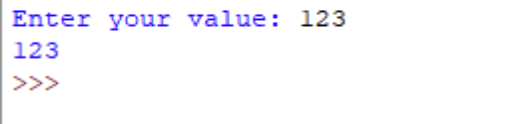
val = input("Enter your value: ")
print(val)
Output: